Docker on Mac: Performance Loss Analysis in M4 Clusters
With the widespread adoption of Apple's M4 silicon, Macs have evolved into formidable compute centers. However, for developers accustomed to x86-based Linux containers, does "Docker on Mac" imply a significant performance penalty? This article analyzes real-world benchmark data from VPSMAC's M4 clusters to reveal the true performance landscape of Linux containers on M4 hardware.
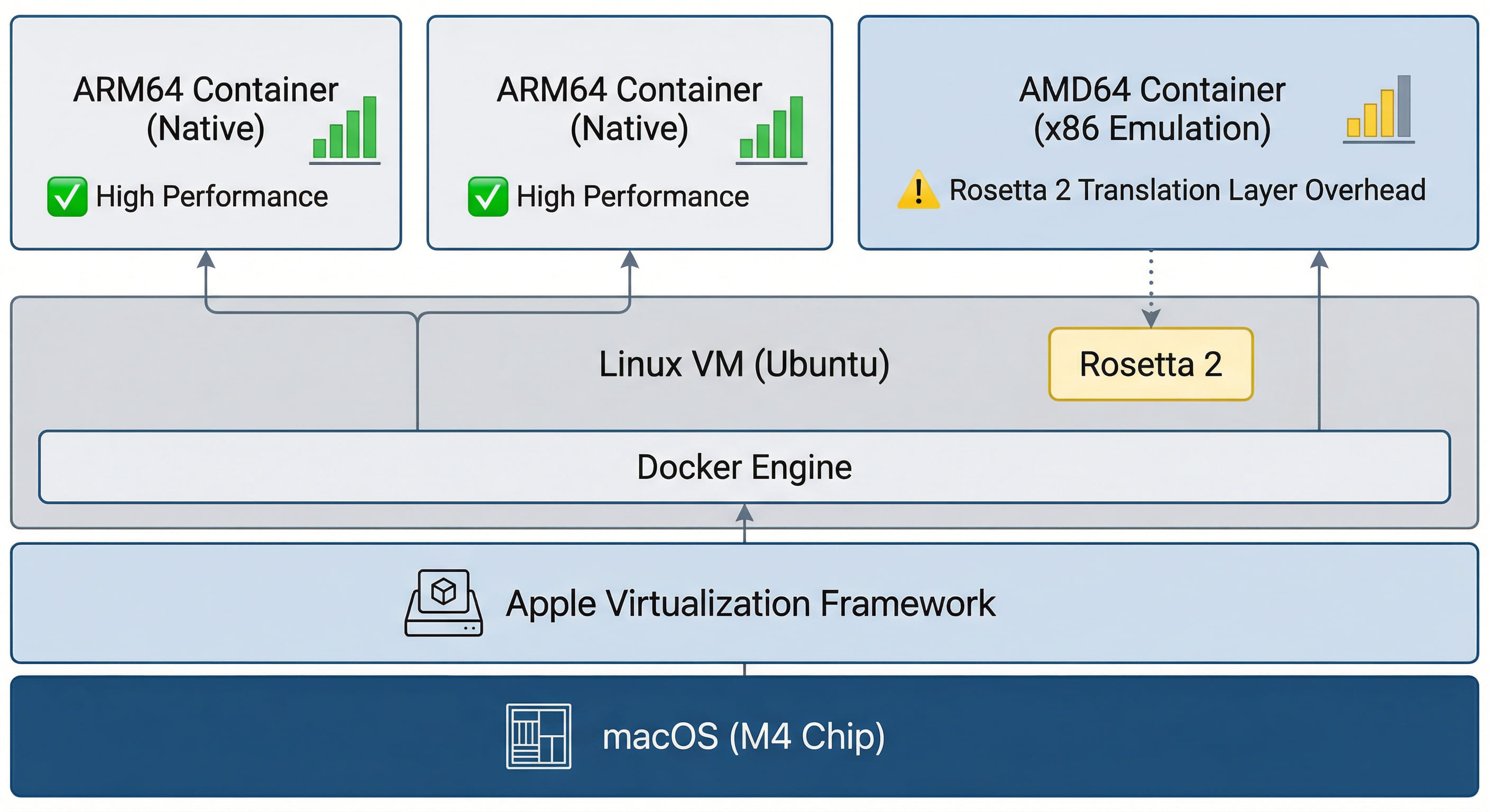
1. Architectural Overview: Virtualization and Instruction Set Translation
Running Docker on an M4 Mac differs fundamentally from running it on a native Linux server. Docker Desktop for Mac operates within a lightweight Linux VM managed by Apple's Virtualization Framework, rather than running directly on the macOS kernel.
There are two primary layers of performance overhead:
- Hypervisor Overhead: Despite excellent hardware acceleration in M4 chips, the virtualization layer typically introduces a baseline performance loss of 3% to 5%.
- Instruction Set Translation: Running
linux/amd64images requires dynamic binary translation via Rosetta 2 or QEMU, which is the primary source of performance degradation.
2. Benchmark Results: ARM64 Native vs. AMD64 Emulation
Using VPSMAC’s high-performance M4 nodes, we conducted Sysbench tests comparing native ARM64 containers and emulated AMD64 containers.
1. CPU Computation (Sysbench 10k Primes)
| Environment | Execution Time (sec) | Performance Loss |
|---|---|---|
| M4 Host (Native) | 4.12 | 0% |
| Docker (linux/arm64) | 4.28 | ~3.8% |
| Docker (linux/amd64 via Rosetta) | 6.45 | ~36.1% |
Analysis: M4 performance is near-native when running arm64 images. However, when running amd64 images, even with Rosetta 2 support, performance drops by nearly 40%. This underscores the importance of using ARM-native base images in M4 environments.
3. Memory and Storage IO: The M4 Advantage
Apple’s Unified Memory Architecture (UMA) in the M4 chip provides extraordinary bandwidth for containerized workloads. In our tests, memory bandwidth within a Docker container reached over 100 GB/s.
Regarding storage IO, the discrepancy between macOS (APFS) and Linux (ext4/xfs) used to be a major bottleneck. However, with the implementation of VirtioFS, IO overhead on M4 clusters is now contained within 10%.
# Recommended Docker parameters for M4 optimization
docker run --platform linux/arm64
           --memory-swappiness=0
           --privileged
           -v /path/to/data:/data:delegated
           my-m4-app:latest
4. Why Choose VPSMAC M4 Clusters?
While local MacBooks may suffer from thermal throttling and memory constraints, VPSMAC's remote M4 nodes offer significant advantages:
- Sustained Peak Performance: Our liquid-cooled data centers ensure M4 chips maintain peak clock speeds without thermal throttling.
- High Memory Allocation: We provide M4 configurations with up to 128GB of RAM, ideal for complex orchestration like Kubernetes on Mac.
- Optimized Network Latency: Strategic routing ensures minimal latency for container-to-service communication globally.
5. Conclusion: High Potential with Minimal Trade-offs
Performance loss on M4 chips is highly dependent on image architecture. By adhering to ARM-native principles, developers can achieve single-core performance that exceeds most x86 servers in the same price bracket. For CI/CD pipelines, AI inference, and high-performance web services, VPSMAC's M4 clusters represent a premier choice for 2026.