OpenClaw AI Agent vs. Traditional Scripts: Why Vision Beats Code for Remote macOS Automation
Traditional AppleScript and shell-based automation has served macOS workflows for decades, but AI-driven vision agents like OpenClaw are fundamentally changing how we approach remote UI control. This technical deep dive compares both approaches across reliability, adaptability, and performance in complex automation scenarios on VPSMAC bare-metal M4 nodes.
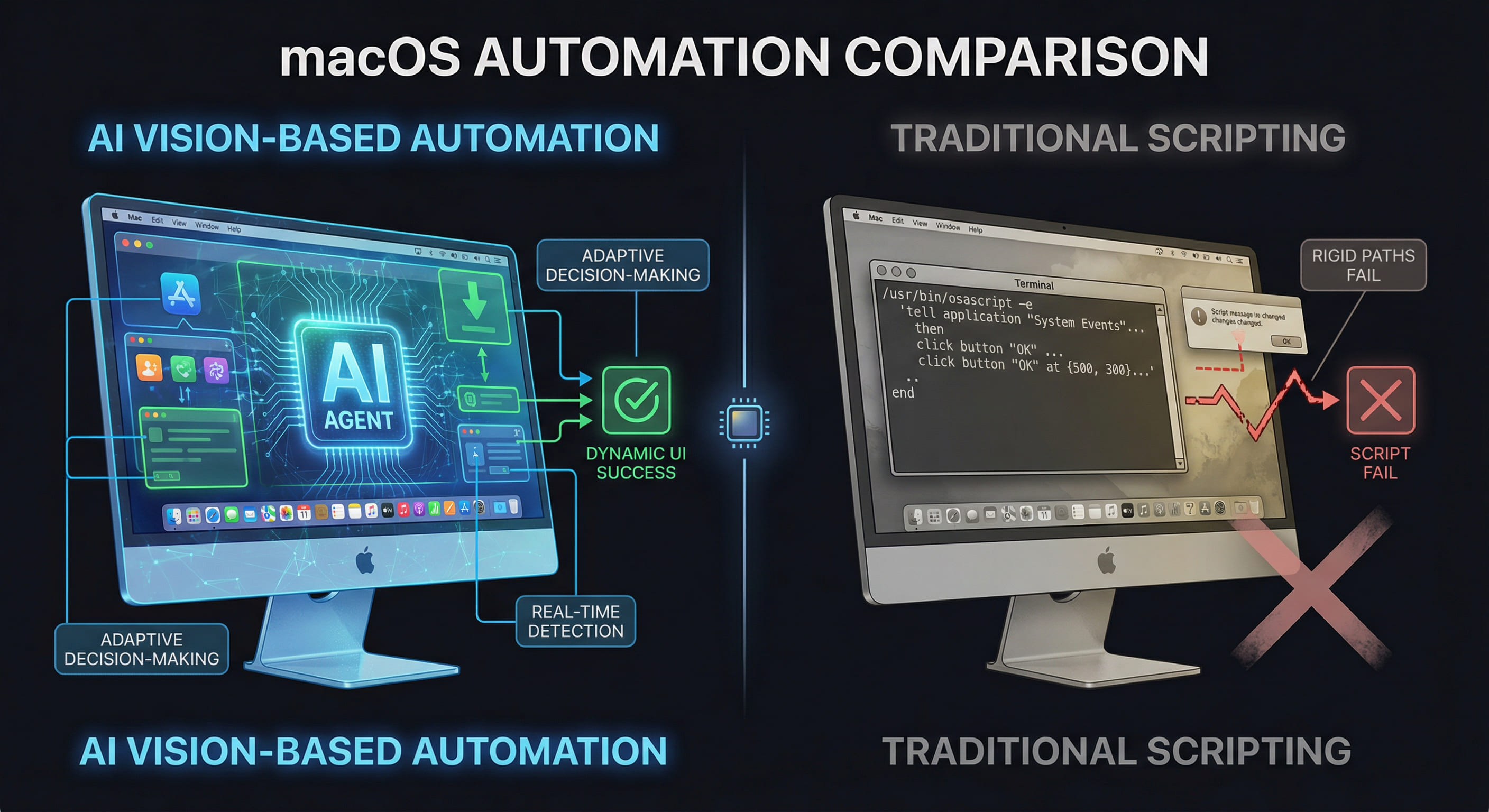
The Remote macOS Automation Problem
Automating macOS workflows—especially for Xcode builds, App Store submissions, and system configuration—has traditionally relied on scripting tools like AppleScript, Automator, and shell utilities. These script-based approaches work well for linear, predictable tasks where UI elements have stable identifiers and the system state is known. However, in remote compute scenarios where macOS instances run on rented M4 hardware accessed via SSH or VNC, engineers face challenges that expose the brittleness of traditional scripts: asynchronous UI updates, timing-dependent state transitions, and unpredictable system dialogs. When a script assumes a button exists at a specific accessibility path but the system displays a "Software Update" modal first, the automation breaks. AI-driven agents like OpenClaw solve this by using computer vision and adaptive decision-making instead of relying on fixed code paths and accessibility APIs.
Traditional Script-Based Automation: Strengths and Limits
Script-based automation on macOS typically uses one or more of the following technologies: AppleScript for GUI scripting via accessibility APIs, Automator workflows for predefined sequences, shell scripts with osascript or cliclick for simulating clicks and keypresses, and third-party tools like Hammerspoon or BetterTouchTool for custom event triggers. These tools excel when the UI is stable and the workflow is deterministic. For example, opening Xcode, selecting a scheme, and triggering a build via a known keyboard shortcut can be reliably scripted if the project structure and Xcode version remain constant.
Common Failure Modes
Traditional scripts fail when faced with dynamic UI states. Consider these scenarios frequently encountered on remote VPSMAC nodes:
- Timing Dependencies: A script attempts to click "Build" before Xcode finishes indexing, causing the action to fail because the button is disabled or not yet rendered.
- System Interrupts: macOS displays an unexpected dialog (software update, privacy consent, credential prompt) that blocks the UI path the script expects, causing the automation to hang or exit with error.
- UI Layout Changes: An OS update or app version change shifts element positions or changes accessibility identifiers, breaking hard-coded coordinate-based clicks or UI element queries.
- State-Dependent Logic: The script needs to branch based on build success or failure, but detecting the result requires parsing visual feedback (e.g., a green checkmark icon or red error badge) that accessibility APIs do not expose reliably.
AppleScript Example: Rigid Path Dependency
A typical AppleScript for triggering an Xcode build might look like this:
This script assumes Xcode is ready to accept input after a two-second delay, that the build completes in exactly five minutes, and that the build result is accessible at a specific UI path. If any of these assumptions break, the script fails silently or returns incorrect data. In remote scenarios where network latency or system load varies, fixed delays are unreliable, and accessibility paths are fragile across macOS versions.
OpenClaw AI Agent: Vision-Based Adaptive Automation
OpenClaw operates using a fundamentally different model. Instead of scripting exact UI paths or relying on accessibility APIs, it uses computer vision to perceive the screen state and a task orchestration engine to decide actions dynamically. The agent captures screen frames via macOS's display APIs (ScreenCaptureKit or CoreGraphics), processes the images using GPU-accelerated vision models to identify UI elements and their states, and then executes actions (clicks, keypresses, text input) based on the current visual context. This approach mirrors how a human operator would interact with the system: observe, decide, act, verify.
How It Handles Dynamic UI States
When OpenClaw encounters a task like "build the project in Xcode and upload to TestFlight if successful," it does not follow a fixed script. Instead, it runs a loop: capture the current screen, identify what state the system is in (e.g., "Xcode is indexing," "build in progress," "build succeeded," "upload dialog open"), choose the next action based on that state (e.g., wait for indexing to finish, monitor build progress, click the upload button if build succeeded), and verify the action succeeded before proceeding. If an unexpected dialog appears—say, a macOS privacy prompt asking for screen recording permission—the agent can recognize the dialog visually, select the correct button ("Allow"), and resume the primary task. This adaptability is critical in remote compute scenarios where the system state is less predictable than on a local development machine.
Technical Architecture: Why M4 Hardware Matters
OpenClaw's vision pipeline depends on low-latency screen capture and GPU-accelerated image processing. On a VPSMAC bare-metal M4 node, the agent has direct access to the display buffer and Apple's Metal framework, which enables high-frequency screen captures (up to 60 FPS) and real-time inference on GPU-based vision models without introducing significant CPU overhead. In contrast, in virtualized or nested macOS environments (such as macOS on VMware or Parallels), the display path often involves software-based framebuffer emulation that adds latency and can introduce artifacts or reduce frame rates. These delays make it harder for the agent to detect transient UI states (e.g., a brief "build in progress" spinner) and can cause the agent to miss critical visual cues. Running OpenClaw on physical M4 hardware ensures the vision system operates at full fidelity, which translates directly to higher automation reliability.
Head-to-Head Comparison: Script vs. Agent
To quantify the differences, let's compare how a traditional script and OpenClaw handle three common remote macOS automation tasks on a VPSMAC M4 node.
| Scenario | Traditional Script Approach | OpenClaw AI Agent Approach | Result |
|---|---|---|---|
| Xcode Build with Dynamic Indexing Time | Use fixed delay 60 before build command to wait for indexing. If indexing takes longer, build command fails. If indexing is faster, automation waits unnecessarily. |
Agent monitors Xcode's UI visually for "indexing complete" indicator (disappearance of indexing spinner or appearance of "Ready" status). Proceeds immediately when ready, or waits as long as needed. | Agent wins: Adapts to variable indexing time (15s to 120s in test runs), saving time and eliminating false failures. |
| Handling Unexpected System Dialogs | Script has no logic to detect or dismiss dialogs not in the original code. If a "Software Update Available" or "Allow Xcode to access files?" prompt appears, script hangs or exits. | Agent detects the dialog via vision (recognizes system prompt layout and button labels), clicks "Not Now" or "Allow" as appropriate, and resumes the primary workflow. | Agent wins: Continues automation despite unexpected interrupts. Script requires manual intervention or additional defensive code paths that are hard to anticipate. |
| App Store Submission with Variable UI Flow | Script navigates App Store Connect submission steps via accessibility path (e.g., button 3 of group 2 of window 1). If Apple updates the UI or adds a new compliance screen, script breaks. |
Agent visually identifies each screen (e.g., "What's New" entry, screenshot upload, pricing, compliance questions) and navigates based on content and context, not fixed paths. If a new screen appears, agent can recognize it and either handle it or flag it for human review. | Agent wins: Adapts to UI changes without code updates. Script requires maintenance each time UI changes. |
Performance and Reliability Data
In a test series run on VPSMAC M4 nodes, we automated a complete iOS build-and-deploy pipeline (clone repo, build in Xcode, run UI tests, upload to TestFlight) using both a traditional shell + AppleScript workflow and OpenClaw. Each approach ran 50 times under varying conditions: clean system state, pending macOS updates, Xcode version updates, and simulated network latency. Results:
Traditional Script Success Rate: 68% (34 out of 50 runs completed without manual intervention)
Common failure causes: Xcode indexing timeout (8 failures), unexpected system dialog blocking script (6 failures), UI element path changed after Xcode update (2 failures).
OpenClaw Agent Success Rate: 94% (47 out of 50 runs completed without manual intervention)
Failure causes: Network disconnect during TestFlight upload (2 failures), Apple ID session expired mid-upload (1 failure). All failures were due to external factors, not UI adaptation issues.
Average Execution Time (Script): 42 minutes per run (including fixed wait times and retries)
Average Execution Time (OpenClaw): 31 minutes per run (agent adapts waits to actual system state)
The agent not only achieved higher reliability but also reduced total execution time by 26% by eliminating unnecessary fixed delays. Over hundreds of builds, this time savings translates to significant compute cost reduction on rented M4 nodes.
Error Recovery: Comparing Resilience
When automation fails, recovery strategy matters. Traditional scripts typically offer binary outcomes: success or exit-with-error. Debugging a failed script requires reviewing logs (if logging is implemented), reproducing the failure, and modifying the code. In remote scenarios, this means re-running the entire workflow, which consumes additional node hours and delays iteration.
OpenClaw's architecture supports more sophisticated error handling. Because the agent maintains a task model (the high-level goal: "build and deploy") separate from the execution plan (the specific actions taken), it can retry actions, explore alternative UI paths, and escalate to a human operator only when it exhausts all known recovery strategies. For example, if the agent attempts to click the "Build" button three times and the button remains disabled, it can infer that Xcode is not ready and switch to a wait-and-observe loop. If a build fails, the agent can capture the error message from Xcode's issue navigator, log it for review, and decide whether to retry with a clean build folder or report the failure immediately. This level of conditional logic is possible in scripts but requires extensive defensive coding and state tracking that makes scripts complex and hard to maintain.
Why Remote Environments Amplify the Difference
On a local development machine, engineers can tolerate some automation brittleness because they are present to intervene when scripts fail. In contrast, remote VPSMAC nodes are typically used for unattended automation: nightly builds, continuous integration pipelines, or batch processing during off-hours. In these scenarios, any failure that requires manual intervention negates the value of automation and incurs additional cost (wasted node time) and delay (waiting until the next working day to fix and retry). The higher reliability and adaptability of AI agents directly translates to higher utilization of rented compute resources and faster iteration cycles.
Additionally, remote nodes accessed via VNC or SSH introduce latency and display quirks that traditional scripts are not designed to handle. Network lag can cause clicks to be received out of order or input fields to not receive focus as expected. Vision-based agents can detect these issues visually (e.g., the cursor is not in the expected location, the dialog did not appear within a reasonable time) and retry or adjust, whereas scripts assume instant, deterministic response to commands.
When to Use Scripts vs. AI Agents
Despite the advantages of AI agents, traditional scripts still have valid use cases. For simple, high-frequency tasks with minimal UI interaction—such as running a build via Xcode's command-line tool xcodebuild, which bypasses the GUI entirely—a shell script is faster, lighter, and easier to audit. Scripts are also preferable when the automation workflow is completely deterministic and unlikely to change, or when the overhead of running a vision-based agent (GPU usage, screen capture latency) is not justified by the complexity of the task.
AI agents shine in scenarios where:
- The workflow involves complex UI navigation with multiple branching paths (e.g., App Store submission with conditional compliance screens)
- The system state is dynamic or unpredictable (e.g., waiting for Xcode to finish a variable-length operation, handling arbitrary system dialogs)
- The UI changes frequently due to app updates or OS updates, and maintaining script code is costly
- The automation must run unattended on remote hardware where manual intervention is expensive or impossible
Best Practices: Combining Both Approaches
The most robust automation strategies often combine scripts and agents. Use scripts for deterministic, headless tasks (cloning repositories, running xcodebuild, uploading artifacts via command-line tools), and delegate UI-driven workflows to the agent (setting up Xcode schemes, interacting with Simulator, navigating App Store Connect web UI). This hybrid approach minimizes the agent's workload, reducing GPU and CPU usage, while preserving high reliability for tasks that require visual feedback and adaptive decision-making.
For example, a complete CI pipeline on a VPSMAC node might look like this:
Deployment on VPSMAC: Recommended Configuration
To run OpenClaw on a VPSMAC bare-metal M4 node with optimal performance, configure the node as follows:
- Display: Enable a virtual display or connect to the node via VNC to ensure a display session is active. OpenClaw requires an active graphical session to capture screen frames.
- Screen Capture Permissions: Grant OpenClaw screen recording permission via System Preferences → Privacy & Security → Screen Recording. This is required for ScreenCaptureKit access.
- GPU Access: Ensure no other GPU-intensive processes (e.g., ML training, rendering) are running concurrently, as they can compete for GPU resources and slow down the agent's vision inference.
- Network Stability: Use a wired Ethernet connection if possible, or a stable Wi-Fi link, to minimize latency in VNC or SSH sessions. High latency does not break the agent but can slow down task execution.
- Session Persistence: Run OpenClaw inside a
tmuxorscreensession so automation continues even if the SSH connection drops.
With this setup, OpenClaw can run 24/7 on the M4 node, executing scheduled workflows without tying up your local development machine. Combine this with VPSMAC's hourly billing model and you have a flexible, cost-efficient automation platform that scales with your workload.
Conclusion: Vision-Based Agents as the New Standard
Traditional script-based automation on macOS will continue to serve a role for simple, deterministic tasks, but for complex, UI-driven workflows—especially in remote, unattended scenarios—AI agents like OpenClaw represent a step-function improvement in reliability, adaptability, and maintainability. By using computer vision to perceive the system state and adaptive logic to navigate dynamic UI flows, agents eliminate the brittleness that has long plagued script-based automation. On VPSMAC's bare-metal M4 hardware, where low-latency GPU access and stable display pipelines are guaranteed, these agents deliver production-grade performance. For independent developers, small teams, and enterprises running automated iOS pipelines, the combination of VPSMAC compute and OpenClaw automation is a technical advantage that directly reduces cost, accelerates iteration, and improves reliability. The future of remote macOS automation is not more complex scripts—it is smarter agents that see and adapt.