2026 OpenClaw Advanced Deployment: Docker Sandboxes Tool Isolation on Mac Cloud
By default, OpenClaw tools (code execution, web scraping, shell scripts) run in the host process — if a malicious instruction or supply chain attack occurs, the consequences can be severe. This guide explains the Docker Sandboxes isolation mechanism, provides a 4-step reproducible setup checklist, and covers uid 1000 volume permission fixes and Mac cloud network troubleshooting (2026 updated).
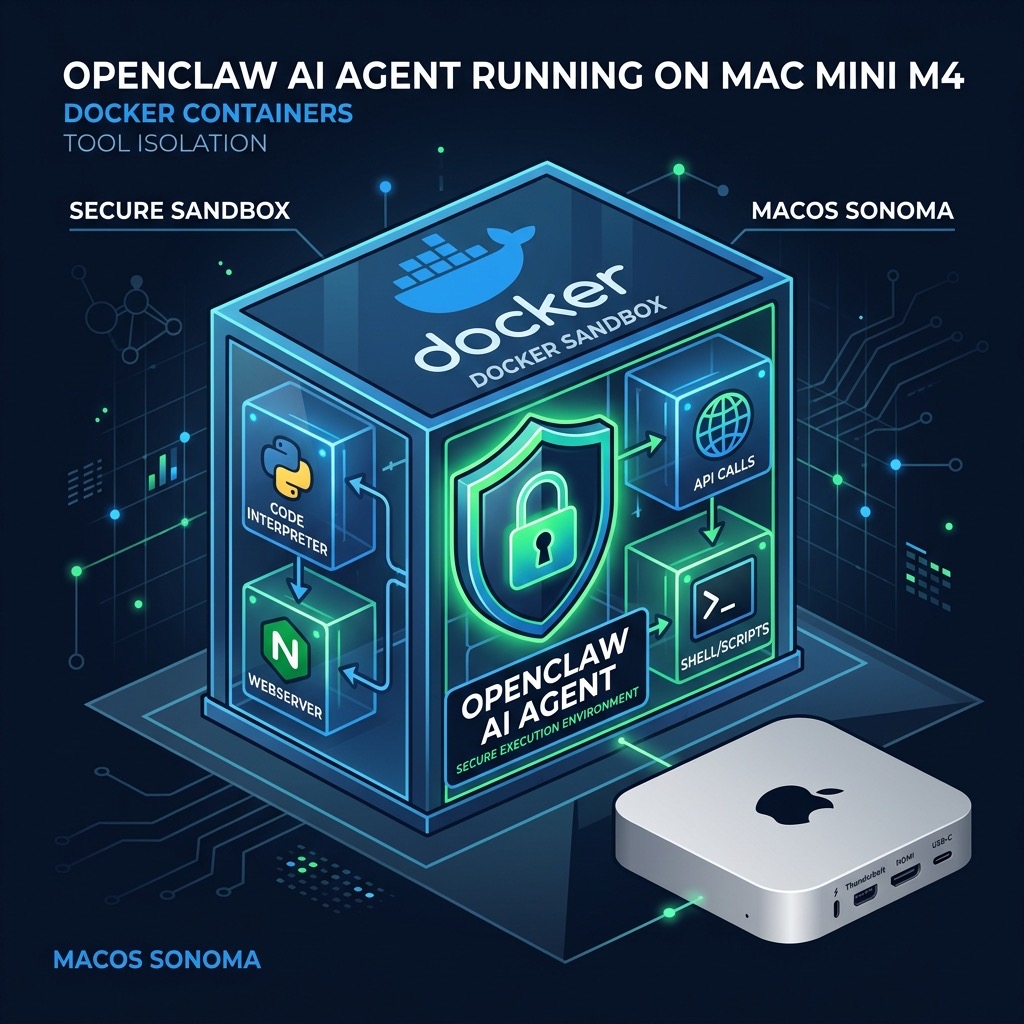
Table of Contents
- 2026 Security Alert: Why AI Agent Tool Execution Must Be Isolated
- How Docker Sandboxes Work: Principles and Prerequisites
- Three Modes Compared: Bare Metal vs Docker Run vs Sandboxes
- 4-Step Reproducible Checklist: Enable Tool Sub-Container Isolation
- Troubleshooting: uid 1000 Permissions and Network Issues
- Technical Benchmarks
- FAQ
2026 Security Alert: Why AI Agent Tool Execution Must Be Isolated
OpenClaw can execute Python scripts, scrape web pages, run shell commands, and read/write the file system. These capabilities are powerful, but if tools run unrestricted in the host process, three threat vectors emerge:
- Malicious ClawHub Skills: Third-party skill packages may carry malicious code that directly accesses the host filesystem and network.
- Prompt Injection Attacks: Attackers craft inputs that induce the model to run dangerous shell commands (e.g.,
rm -rfor data exfiltration scripts). - Dependency Chain Poisoning: Tampered third-party libraries execute malicious logic during installation or runtime.
- Resource Abuse: Runaway tool calls consume host CPU/memory, making other services unavailable.
~/.openclaw/keys/ via path traversal. Enabling Docker Sandboxes in production is strongly recommended.How Docker Sandboxes Work: Principles and Prerequisites
With Sandbox mode enabled, each tool call flow is:
- Gateway receives a tool call request (e.g.,
run_python) - OpenClaw uses Docker CLI to spin up a temporary sub-container (from the official sandbox image)
- Tool code executes inside the sub-container, restricted by its filesystem, network namespace, and resource limits
- Results are returned via stdout/stderr; the container is immediately destroyed
Prerequisites (Mac Cloud Node)
- Docker Desktop for Mac installed and running (version ≥ 4.28)
- OpenClaw version ≥ v2026.1.0 (supports
OPENCLAW_INSTALL_DOCKER_CLI=1) - Host user has Docker socket access (
/var/run/docker.sock) - Mac cloud node memory ≥ 16GB (sandbox containers have their own memory overhead)
/var/run/docker.sock (DooD pattern).Three Modes Compared: Bare Metal vs Docker Run vs Sandboxes
| Dimension | Bare Metal (No Isolation) | Docker Compose Deployment | Docker Sandboxes (Recommended) |
|---|---|---|---|
| Tool Execution Isolation | ❌ Host process | ⚠ Container process, shared with OpenClaw | ✓ Independent sub-container per tool call |
| Filesystem Access | ❌ Full host access | ⚠ Limited by volume mounts | ✓ Fully isolated, configurable minimal mounts |
| Network Isolation | ❌ Full host network | ⚠ Docker network, egress allowed | ✓ Configurable: none/bridge/custom policy |
| Resource Limits | ❌ Unlimited | ⚠ Compose-level limits | ✓ Per-container CPU/memory caps |
| Best For | Local dev/test | Basic production | Production, 24/7, multi-user, enterprise |
4-Step Reproducible Checklist: Enable Tool Sub-Container Isolation
Step 1: Reinstall OpenClaw with Docker CLI Support
Expect sandbox: docker or tool-runner: docker in the output.
Step 2: Verify Docker Socket Access
Step 3: Pre-pull the Sandbox Base Image
Step 4: Start OpenClaw and Verify Sandbox Mode
Troubleshooting: uid 1000 Permissions and Network Issues
Issue 1: Permission Denied — uid 1000 Volume
Issue 2: DNS/Network Failure Inside Sandbox
Egress Policy Recommendations (Production)
| Scenario | Network Policy | Config |
|---|---|---|
| Pure code execution | none (fully offline) | --network none |
| Web scraping tools | bridge (controlled egress) | Default bridge + firewall rules |
| Internal API calls | Custom Docker network | docker network create openclaw-internal |
Technical Benchmarks
- Sandbox container startup latency: Cold start ~200-400ms on M4 Mac mini; ~50-150ms with cached image. Use keep-alive container pool for latency-sensitive workloads.
- Recommended resource caps:
--memory 512m --cpus 0.5per sandbox container. - Memory requirements (with Sandboxes): Gateway ~500MB + ~512MB per concurrent sandbox. M4 Mac mini 16GB supports 4-6 concurrent tool calls safely.
- OPENCLAW_INSTALL_DOCKER_CLI=1: Adds ~2-3 minutes to installation time (builds Docker tool runtime layer).
- uid 1000: Official sandbox image default user. All mounted directories must be pre-
chown 1000:1000.
FAQ
Q: Does enabling Sandbox slow down tool calls?
Slight latency increase (~200-400ms cold start per call). Negligible for most automation. For latency-sensitive scenarios, use a keep-alive container pool to reduce to under 50ms.
Q: Is Sandbox compatible with Docker Compose deployment?
Fully compatible. Mount /var/run/docker.sock into the OpenClaw container in Compose to enable DooD (Docker-outside-of-Docker) mode.
Q: How do I confirm a tool call ran inside a sandbox?
Run docker ps | grep openclaw-sandbox during a tool call. You should see a temporary container appear and auto-destroy. Also check OpenClaw logs for the sandbox=true field.
Q: Does Sandbox support stateful tools (e.g., DB writes)?
Yes, via named volume mounts: volumes: ["openclaw-data:/workspace/data"]. Data persists in the Docker named volume after container destruction.
Bare-metal or basic Docker OpenClaw deployments are fine for development. But in production — especially 24/7 operation, multi-user nodes, or third-party ClawHub Skills — running tools without isolation is equivalent to granting full execution access to anyone who can control the prompt. Docker Sandboxes closes this surface at an acceptable latency cost. VPSMAC M4 Mac cloud nodes with up to 64GB unified memory and native Docker Desktop support are the ideal substrate for running OpenClaw in Sandbox mode.